

Tutorial
| How to assign your WebMasterQuest credits: |
 |
From within
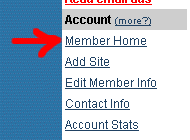
the WebMasterQuest member area menu, simply click on the "Member Home " menu link. From here, you can assign your
credits/percentages, and you can also move credits between your
websites. Your total unnused credits are displayed at the top of the
assignment box, along with your unnused credit
percentage. |
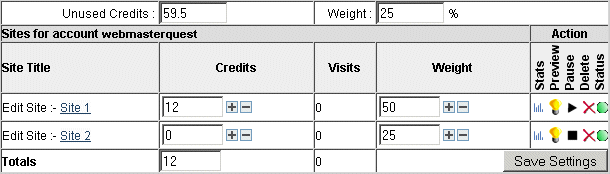
The Assignment Box (shown below), is where you assign credits to the websites that you have nominated for rotation. In this example, there are 2 sites, 1 site already has credits assigned to it and the other doesn't.
To assign credits to an existing website, simply type (or use the plus and minus buttons) the amount of credits that you wish to assign directly into the box located to the right of your website name. In the example above, you would type a number into the box that currently contains the number "0", shown to the right of the website known as "Site 2 ".
|
||
You can assign as many credits as you wish, from your total unnused credits. To put your websites into heavy rotation, it is advised that your combined weighting equals 100%. In the example above, the first website "Site 1 " has a weighting of 50%, indicating that it will be displayed more often that the second website at 25%. |
 " in
the "Pause" column. To stop a website from "using up" your
credits, simply click on the "
" in
the "Pause" column. To stop a website from "using up" your
credits, simply click on the " "
icon, the image below shows "Site 2" is paused and not active.
"
icon, the image below shows "Site 2" is paused and not active. Moving Credits |
| Moving
credits ... You can also move credits to an another website or unassign them, by changing the numbers in the "Credits" column and the saving your new settings. |