
Advertise your banner here. As low as $0.48 CPM

     
Username

Password


Lost password?
Main
FAQ
Cookie settings
Tutorial
Tutorial
Surf for credits
Assign Credits
Add website
Add banner

WebmasterQuest Tutorial

How to surf WebMasterQuest, to generate website traffic:

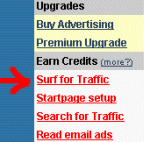
From within the WebMasterQuest member area menu, simply click on the red "Surf for Traffic" link, and you will instantly begin to earn credits towards your account. These credits can be used to promote your website(s), or alternatively can be exchanged for other forms of WebMasterQuest advertising, such as banners, email ads or the new "hotlinks". Surfing regularly has some top benefits, including the chance to win real cash and free credits!
This is a screen capture of the options menu, available as soon as you log into the WebMasterQuest member area. Simply click the "Surf for Traffic" link, to begin earning free traffic!

Webmasterquest is the most responsive startpage exchanges on the internet, with thousands of member websites in rotation, and advanced fraud protection. Every time you view a member website, you will earn credits towards your account. To insure that real people are viewing member websites, WebMasterQuest employs an advanced "anti-cheating" system known as the verification number.

The WMQ Surfbar ...
Whenever you surf to a new member website, a 30 second timer will begin to count down to zero. You must wait until the timer counts down to zero, before you click the correct number to proceed to the next page. Every website that you visit generates a new surfbar request box, that contains six numbers, and a verification number (shown in the red circle, below).

A screen capture of the WebMasterQuest surf bar, with full statistics, administration options, advanced anti-cheating technology, and rotating member banners ...

In the example above, the verifcation number requests that you "Click 86". Clicking this number, from the choice of six, insures that you will earn credits towards your account, and the next member website will begin to load. The more pages you surf, the more credits you earn! Every page that you display, will also be accompanied by a fresh banner, and a collection of hotlinks shown at the botom of the page (below)..
A screen capture of the WebMasterQuest "hotlinks", located at the bottom of every page. This is a great way to generate targeted clicks from interested visitors!


UC = Unused Credits
HL = Hotlink Credits
$ = Cash in account
CE = Credit(s) earned for last page
AC = Auto assigned Credits
SC = Session Credits


The surfbar also contains statistics about your account. A description for each abbreviation is shown on the left. You can also click on any of these links for a convenient list of the full descriptions, or just "mouse over" any of the text links and a description is displayed in the bottom browser bar at the end of the page.

Note: If you are surfing for the first time on any particular day, then you will see the WebMasterQuest information page shown as the initial page in rotation. This contains information about our startpage exchange, links to purchase credits, our competition winners and other assorted details about the WebMasterQuest exchange. You do not earn credits for displaying this page.


Targeted website traffic ...
Surf up as many credits as you wish, knowing that your website(s) will be placed into rotation, displayed in front of real and verified people. Wait for the timer to hit zero, and then make sure that you click the correct verification number. When you no longer wish to surf for credits, then click on the 'My Account' link, and you will be returned to your WebMasterQuest account information area.

(Please remember that 50% of all earned credits are added to your main site. This is to get more sites into rotation and make more sites available for other members to visit).

Webmaster Quest
Terms - Privacy - Contact
Copyright © 2001-2008 by WebmasterQuest.com